
Microlite BackupEDGE 03.05.06†
Backup Software for LINUX and UNIX!
†Build 2 Now Available! Try it FREE NOW for 60 days!
BackupEDGE™ is a high performance, easy to use, fully integrated backup, restore and bare metal disaster recovery software product for Linux® and UNIX® operating systems.
It manages
the entire process of protecting critical data
while shielding the user from the headaches involved in directly managing individual actions
It supports
the industry's widest variety of storage devices,
including traditional tape drives, Blu-ray Disc™ (BD-RE), DVD and CD writers, tape changers, libraries and autoloaders, and USB and SATA† flash drives, disk drives and cartridges.
It supports
backups to network-attached storage
(NAS) devices, servers and appliances over the local network or Internet using the FTP, FTPS, SMB/CIFS, NFS and Object Storage protocols†
BackupEDGE fully supports
Cloud (Internet) backups
using the S3 object storage protocol. Backup to Amazon S3, Google Cloud Storage, Backblaze B2, Wasabi Hot Cloud Storage and others.
BackupEDGE
uses a modern, standards-based data format
This allows for very long pathnames, very high compression ratios, ACLs (access control lists), multiple archive verification strategies and highly secure data encryption.
Its modular architecture
providing great flexibility
in implementing and maintaining backup strategies.
Its Scheduler
is one of the most flexible in the industry,
combining Date, Time, Domain and Backup Type with Resource Quotas and Retention Times, to allow users to create simple or highly configurable storage strategies.
BackupEDGE
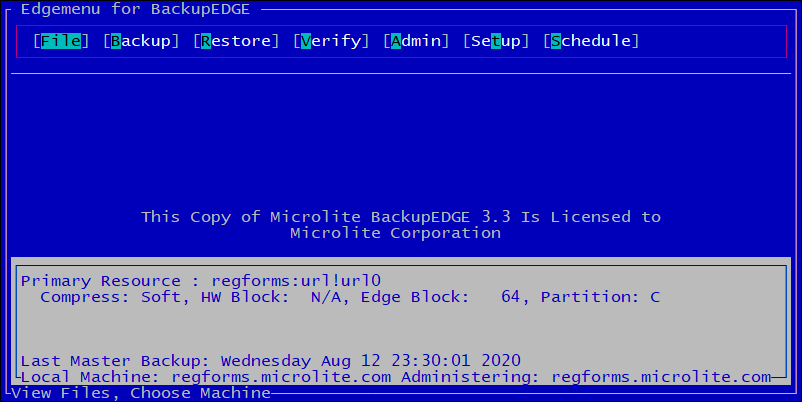
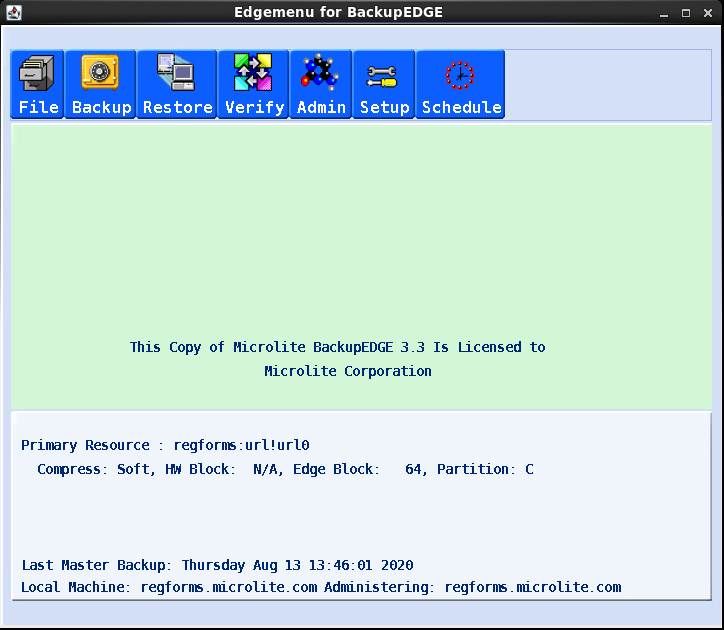
has an industry exclusive management interface
called EDGEMENU. The dual-mode interface runs on the graphical desktop in Linux or may be run in character mode from the character console or from terminals and terminal emulators.
† Operating system dependent.
RecoverEDGE
Automated Bare Metal recovery software!
RecoverEDGE™ is automated bare metal recovery software. It allows complete recovery after a hardware failure without having to re-install the operating system, configure device drivers, etc. It comes free with the Linux, UnixWare® 7, OpenServer™ 6 and OpenServer 5 versions of BackupEDGE.
RecoverEDGE bootable media and a BackupEDGE backup are all that is necessary to recover from a hardware or software catastrophe.
Boot media types include:
- CD / DVD / Blu-Ray Disc™
- USB Disk / Flash Media
- ISO Image
- PXE Boot Image
Linux Versions support UEFI or BIOS-based installations .
What To Do
Next
- Click on our Downloads link to download and install a no-charge 60 day BackupEDGE demo on your own server.
- Learn more about BackupEDGE 3.x.
- See What's New in our 3.x product line.
- Download the Reviewer's Guide to get a quick overview.
- Get the User Guide for all current product information.
- See our Worldwide Cloud Backups section for more information on inexpensive cloud storage.
- See the latest training videos on our YouTube Channel.
- Opt in or out of our Newsletter Mailing List.
BackupEDGE
NEWS!
- openSUSE LEAP 16.0 Support
- SUSE Linux Enterprise Server 16 Support
- Oracle Linux 10.2 Support
- Red Hat Enterprise Linux 10.2 Support
- Rocky Linux 10.2, AlmaLinux 10.2 Support
- Red Hat Enterprise Linux 9.8 Support
- Rocky Linux 9.8, AlmaLinux 9.8 Support
- Red Hat Enterprise Linux 10 Support
- Rocky Linux 10, AlmaLinux 10, Oracle Linux 10 Support
- Ubuntu 25.10 Server Questing Quokka Support
- Ubuntu 24.04.3 LTS Server Noble Numbat Support
- SUSE Linux Enterprise Server 15 Servive Pack 7 Support
- Red Hat Enterprise Linux 9.6 Support
- Rocky Linux 9.6, AlmaLinux 9.6, Oracle Linux 9.6 Support
- Ubuntu 25.04 Server Plucky Puffin Support
- Ubuntu 24.04.2 LTS Server Noble Numbat Support
- OpenServer 6 D2M2 on Promox Support
- Red Hat Enterprise Linux 9.5 Support
- Rocky Linux 9.5, AlmaLinux 9.5, Oracle Linux 9.5 Support
- Ubuntu 24.10 Server Oracular Oriole Support
- Ubuntu 24.10 Desktop Oracular Oriole Support
- SUSE Linux Enterprise Server 15 SP6 Support
- openSUSE LEAP 15.6 Support
- Ubuntu 24.04 LTS Server Noble Numbat Support
- Red Hat Enterprise Linux 9.4 Support
- Rocky Linux 9.4, AlmaLinux 9.4, Oracle Linux 9.4 Support
- Red Hat Enterprise Linux 8.10 Support
- Rocky Linux 8.10, AlmaLinux 8.10, Oracle Linux 8.10 Support
- Proxmox Linux Virtual Clients now supported
- XCP-NG Linux Virtual Clients now supported
- Red Hat Enterprise Linux 9.3 Support
- Press Release - Backblaze B2 Support
- Amazon S3 Online Guide!
- Backblaze B2 Online Guide!
- Wasabi Hot Cloud Storage Online Guide!
-
New Training Video on YouTube!
Using S3CLOUD Resources with Wasabi Hot Cloud Storage - Updated Support End-Of-Life Information!
BackupEDGE
03.05.06 Build 2 Now Available!
- Suse Linux Enterprise 16.0 Support
- openSUSE Leap 16.0 Support
- Oracle Linux 10.2 Support
- Oracle Linux 9.8 Support
- Updated Compression Libraries
BackupEDGE
03.05.06 Build 1 Now Available!
- Updater Repaired.
New Updated in EDGEMENU - Installer Maintenance.
Fixed installation bug with new tar - Red Hat Enterprise Linux 10.2 Support
- Rocky Linux 10.2, AlmaLinux 10.2, Support
- Red Hat Enterprise Linux 9.8 Support
- Rocky Linux 9.8, AlmaLinux 9.8, Support
BackupEDGE
03.05.05 Build 1 Now Available!
- Red Hat Enterprise Linux 10 Support
- Rocky Linux 10, AlmaLinux 10, Oracle Linux 10 Support
- Ubuntu 25.10 Server Questing Quokka Support
- Ubuntu 24.04.3 Server Nobel Numbat Support
BackupEDGE
03.05.04 Build 2 Now Available!
- SUSE Linux Enterprise 15 Service Pack 7 Support.
- Ubuntu 25.04 Server Plucky Puffin Support
- Red Hat Enterprise Linux 9.6 Support
- Rocky Linux 9.6, AlmaLinux 9.6, Oracle Linux 9.6 Support
BackupEDGE
03.05.04 Build 1 Now Available!
- OpenServer 6 D2M2 on Promox Support
- Red Hat Enterprise Linux 9.5 Support
- Rocky Linux 9.5, AlmaLinux 9.5, Oracle Linux 9.5 Support
BackupEDGE
03.05.03 Build 3 Now Available!
- Ubuntu 24.10 Server Oracular Oriole Support
- Ubuntu 24.10 Desktop Oracular Oriole Support
- OpenServer 6 D2M2 Support
- Maintenance Updates.
Network libraries updated, Improved Kernel Discovery, Improved LVM handling .
BackupEDGE
03.05.03 Build 2 Now Available!
- Red Hat Enterprise Linux 8.10 Support
- Rocky Linux 8.10, AlmaLinux 8.10, Oracle Linux 8.10 Support
- Ubuntu 24.04 LTS Server Noble Numbat Support
- Linux Mint 21.3 Virginia Mate Edition Support
BackupEDGE
03.05.03 Build 1 Now Available!
- Red Hat Enterprise Linux 9.4 Support
- Rocky Linux 9.4, AlmaLinux 9.4, Oracle Linux 9.4 Support
- Linux Virtual Client support for Proxmox 8.1.4
- Linux Virtual Client support for XCP-NG 8.2.1 with Xen Orchestra
- Linux Virtual Client support for VirtualBox 7.0
- Linux Virtual Client support for QEMI-KVM 8.0
BackupEDGE
03.05.02 Build 3 Now Available!
BackupEDGE
03.05.02 Build 2 Now Available!
- Ubuntu 22.04.3 LTS Server Support.
- Maintenance Updates.
Network libraries updated, extra disk support for asynchronous disk discovery, improved network modules loading for Unixware, Improved network moudule handling for linux
BackupEDGE
03.05.02 Build 1 Now Available!
- Ubuntu 23.04 Server Lunar Lobster Support.
- Ubuntu 22.04.2 LTS Server Support.
- Ubuntu 20.04.6 LTS Server Support.
- Red Hat enterprise 9.2 Support.
- Oracle Linux Server 9.2 Support.
- Alma Linux 9.2 Support.
- Rocky Linux 9.2 Support.
- 6.x Kernels now supported (edgelx60_64).
BackupEDGE
03.05.01 Build 2
- Ubuntu 22.10 Kinetic Kudu Support.
- Ubuntu 22.04.1 LTS Server Support.
- Ubuntu 20.04.5 LTS Server Support.
- SUSE Linux Enterprise 15 Service Pack 4 Support.
- openSUSE Leap 15.4 Support.
- ZST compressed module Support.
- Improved UEFI boot entries Support.
- Improved Installer for stricter security settings
BackupEDGE
03.05.01 Build 1
- Red Hat enterprise 9 Support.
- Oracle Linux Server 9 Support.
- Alma Linux 9 Support.
- Rocky Linux 9 Support.
BackupEDGE
03.05.00 Build 2
- Ubuntu 22.04 LTS Server Support.
- BackupEDGE 03.05.00 now Tested and Certified for use with:
- Red Hat Enterprise Linux 8.6
- Oracle Linux Server 8.6
- Rocky Linux 8.6
- Alma Linux 8.6
BackupEDGE
03.05.00 Build 1
BackupEDGE
03.04.02 Build 2
BackupEDGE
03.04.02 Build 1
- BackupEDGE 03.04.02 now Tested and Certified for use with:
- Red Hat Enterprise Linux 8.5
- Oracle Linux Server 8.5
- CentOS 8.5-2111
- Rocky Linux 8.5
- Alma Linux 8.5
- Backblaze B2 support.
- S3CLOUD Port support.
- Additional S3CLOUD Signature 4 support.
BackupEDGE
03.04.01 Build 3
See our Newsletter File for additional information.

Click HERE for Older News!
Last Updated - 08-17-2026